dbExpress Data Manager
Open the Data Manager from the Thorium Builder toolbar or from the File Menu as represented above.
(The Data Manager is not available in the Free Edition of Thorium Builder)

1: Tables and Services List
2: Add-Remove-Edit Tables
3: View Smart Objects Categories
4: Edit Smart Objects Categories
5: View Smart Objects
6: Edit Smart Objects
7: Edit Table Access Rights
The Categories Manager
(Smart Objects only)
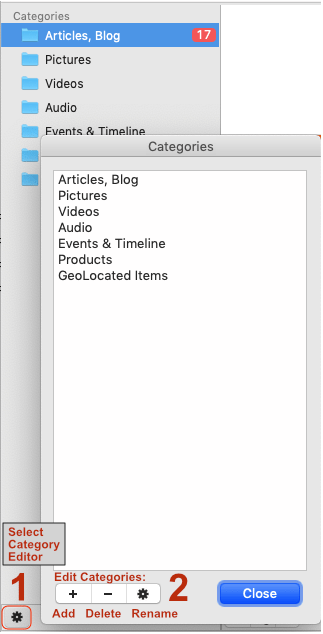
The Left side of the Data Manager Window shows the Category Manager. It displays the various Categories that are available for the records within the Database. You can create, rename or delete categories by using the settings icon (1) at the bottom of the Category Manager . (See the illustration) When you click on the Category Manager settings icon (1) at the bottom of the list. A new Categories Editor (2) will open up. Here, you can add +, delete -, or rename the categories in the editor. Use the close button when finished updating your categories.