Thorium Builder 1.3.1 Release Notes
RELEASE DATE: March 28th 2020
https://www.thoriumbuilder.comhttps://www.thoriumbuilder.comFrameworks & External Components
Framework7 updated to 5.4.2. Read the release notes here: https://framework7.io/release-notes/
Google Firebase API
Form Image Resize & Rotate
Insert & Edit Forms now include a Rotate Menu and Auto Resize Images on client size. Max size Image can be set from the Form Settings
Auto Resize: because Firebase does not include tools for resizing images at server side, Thorium now includes a client side image resize process. Just set up the maximum Width/Height in pixels from your form settings, and all images sent to Firebase will always be resized.
Rotation : Images taken on a mobile phone are rotated by using EXIF information, it means that they are not physically rotated but there is just an information within the Exif Metadata that indicates the rotation. Unfortunately, for PWA running on Chrome or Safari, this Exif Information is not used and images are displayed with the wrong rotation. TB 1.3.1 now includes a button that lets the user rotate the images physically before sending them to the server.
TIP
Important: existing project forms must be edited and revalidated in order to implement the new features.
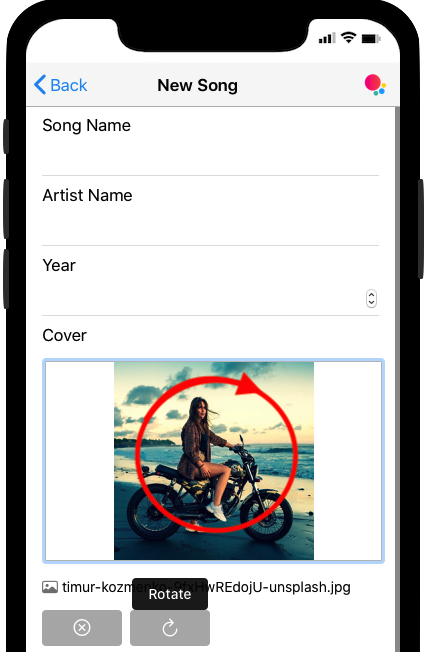
Form Example With Image Resize&Rotation
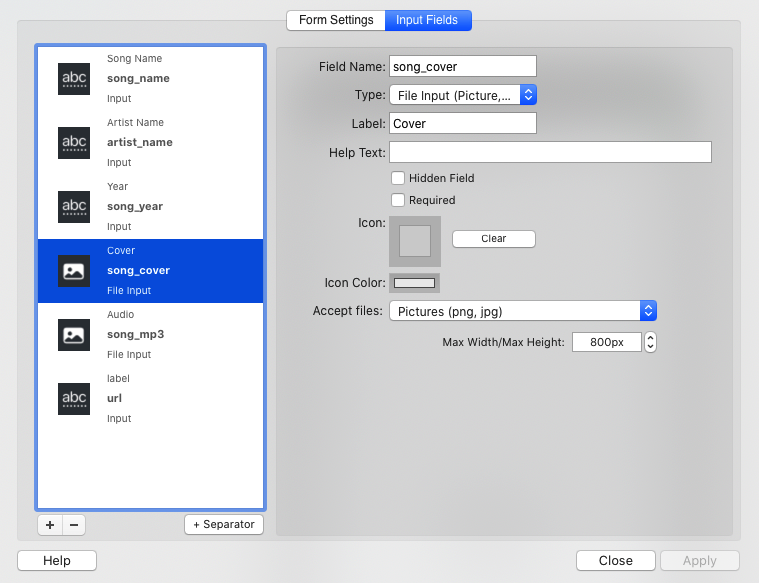
New Form Settings Dialog
Enhancements & Bug Fixes
Added: New Simulator Display Mode without Frame
Added: Link to update in Notifications, and new Menu “Check for Update” (Help Menu)
Added: new inserted records now include automatically a createdbyname on Google Firebase.
Added: Form input of type Files & Select can now have a “Required" status
Added: PWA Forms can now include Group Separators with label.
Added: Forms now check if dropped files on file input of type Image are images (Firebase Form)
Added: DB Links can now be displayed as button
Bug Fix: Firebase Photos&Document input security issue on Chrome
Bug Fix: Widget Popup Menu now available when Simulator is Opened
Bug Fix with WebShare From collection image
Bug Fix: Link was not working when duplicating Firebase fields
Bug Fix: OpenGraph Image now set to absolute url instead of relative
