Calendar
The Calendar Widget lets you add a Calendar to your App.
When you drag&drop a Calendar Widget to your App, it is displayed like that:
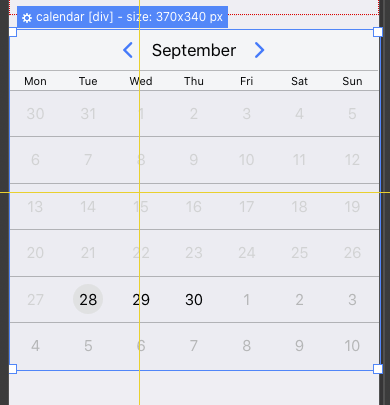
Double-click on the Calendar view for changing the initial settings:
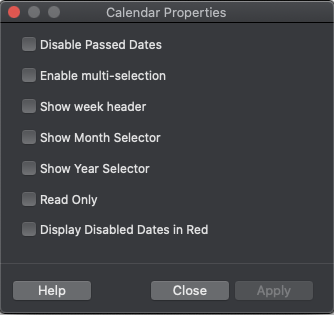
Properties
Disable Passed Dates: Dates less than today appear disabled
Enable Multi-selection: if this option is selected, then the user can select multiple dates (else only one -selected date is allowed)
Show Week Header: if this option is selected, then the days of the week are displayed on top of the calendar
Show Month Selector: if this option is selected, then the user can select a month
Show Year Selector: if this option is selected, then the user can select a year
Read Only: if this option is selected, then the user can’t select any date
Display Disable dates in Red: if this option is selected, then disabled dates are displayed inside a red bubble.
Calendars translation
It is possible to change the name of days and months by changing a global variable.
For example, if you want to change the days and months names, you can execute the following lines at App startup:
kdayNames=['dimanche','monday','tuesday','wednesday','thursday','friday','saturday'];
kdayNamesShort=['dim','mon','tue','wed','thu','fri','sat'];
kmonthNames=['Janvier','Février','March','April','May','June','July','August','Septembre','October','November','December'];
kmonthNamesShort=['Jan','Feb','Mar','Apr','May','Jun','Jul','Aug','Sep','Oct','Nov','Dec'];
dbExpress Calendars (SQLite)
Calendars are also implemented as a DB Calendar, so you can load existing dates into a calendar and save the user selection to an SQLite table.
You then have additional options:
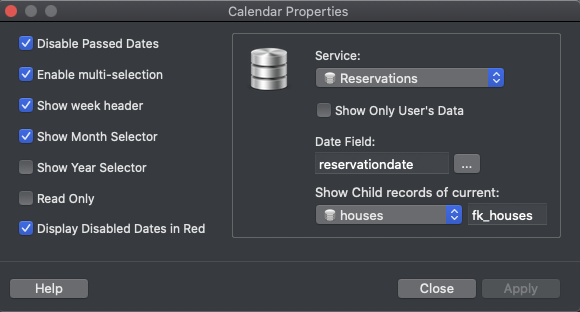
Service: the table/service from where you want to read the dates and where you will write the user selection
Show Only User’s data: if this option is selected, then the calendazr will only load the dates created by the current user.
Date Field: the field of the selected service that contains the dates (must be of type date)
Show child records of current...: when the calendar is added to a page called by a repeater, then the calendar can load only the dates that are childs of the current record. Foir example, it can load the reservation dates of a specific property in the case of a “Properties Booking” app.
Saving User Selection
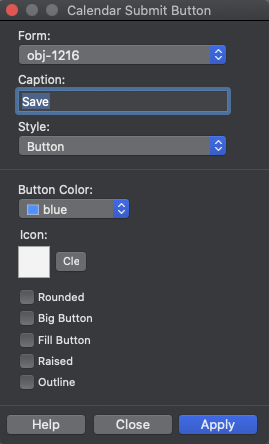
Once you have setup the Calendar's Service and date field, then it is possible to implement a “Save” button that will write the selected dates to the selected table.
You have to add a “Calendar Submit Button” to your page and link it to the calendar:
NOTE
Saving a Calendar selection is a function only available to Registred users, Anonymous users won’t be able to save a dates selection.
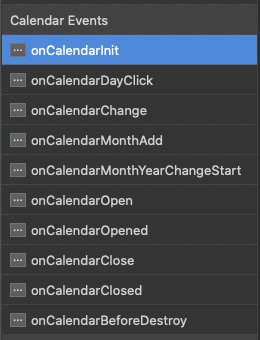
Calendars Events
Some events are available when working with Calendars:
Calendars API Functions
The Thorium API includes some shortcut functions:
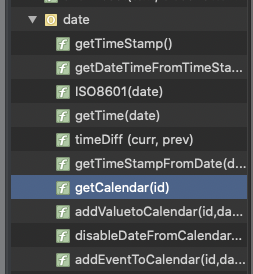
You can get a Calendar reference by using the function getCalendar(id).
For example myCalendar= thoriumapi.date.getCalendar(“calendar_1234”);
With this Calendar object, you can use all the Framework7 functionalities described here: https://framework7.io/docs/calendar.html